Loading…
Advanced Analytics
Advanced analytics built around SnapQL and SnapQL pipelines.
The advanced analytics story is not just that DataLAB can run queries. It is that teams can work through real analytical processes in a SQL-first environment, then turn repeated work into SnapQL pipelines.
This is especially useful where analysts need more than ad hoc querying but do not want every workflow to become a separate engineering project.
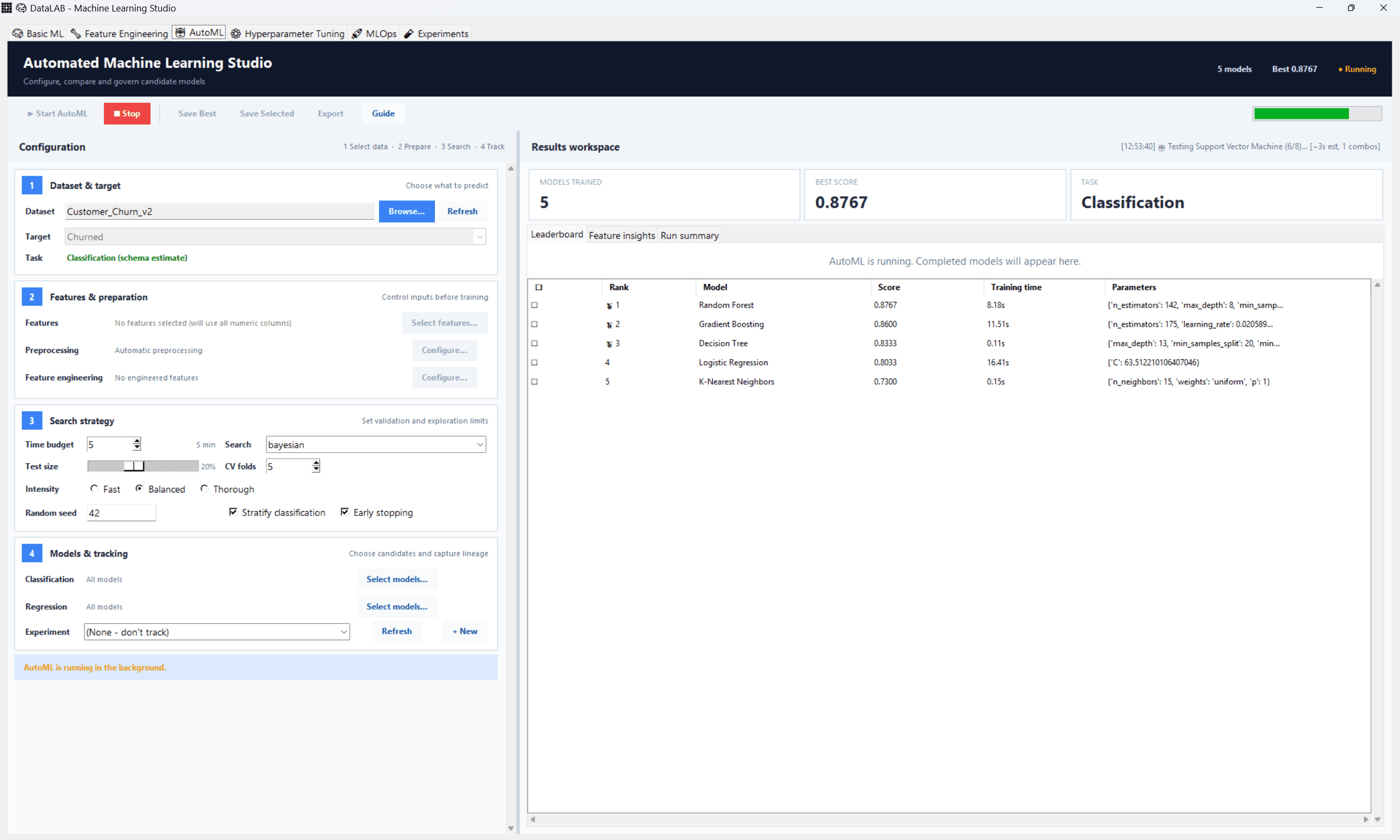
AutoML in actionModels compared in one workspace
Teams that already think in SQL
The story is strongest where analysts and technical users already understand query-driven work and want a more capable workflow layer around it.
Repeated analytical processes
SnapQL pipelines matter most when the same preparation, validation, and reporting logic needs to be run again and again with less manual effort.
Deliberate desktop-first delivery
Keep large datasets, local compute, SQL, model training, and repeatable workflows close to the analyst, with a server-ready path for team access.
SnapQL Coverage
What makes the advanced analytics layer useful
The value is not only expressive querying. It is the ability to turn analysis into a cleaner, more repeatable operating workflow.
SnapQL querying
Use SnapQL as the working language for practical business analysis, from quick inspection to more structured analytical workflows.
SnapQL pipelines
Turn repeated preparation, validation, transformation, and export work into named pipelines instead of rebuilding the process manually every cycle.
Structured validation
Keep analytics closer to operational reality by combining query work with validation steps, exception handling, and repeatable outputs.
Connected workflow surface
Keep query logic, datasets, results, validation review, and export actions close together instead of scattering them across disconnected tools.
Why It Matters
Queries are useful, but repeatable analytical workflows are better
Many teams can write a useful query once. The harder problem is turning that work into something the team can rerun, validate, and trust when the same request appears again next week or next month.
SnapQL and SnapQL pipelines are the stronger story because they move the product beyond one-off query execution into a more structured analytical operating model.
1
Query with intent
SnapQL gives teams a direct way to inspect, aggregate, and validate business data without wrapping every task in a different tool or notebook flow.
2
Package repeat work into pipelines
SnapQL pipelines let teams capture recurring preparation, transformation, and export logic so the workflow becomes easier to rerun and explain.
3
Carry results into adjacent workflows
Outputs can move into reporting, validation review, model work, or downstream exports without losing the thread of how the analysis was built.
snapql.pipeline
-- SnapQL: inspect and prepare business data
SELECT entity,
       DATE_TRUNC('month', CAST(posting_date AS DATE)) AS month,
       SUM(debit_amount) - SUM(credit_amount) AS net_movement,
       COUNT(*) AS order_lines
FROM sales_transactions
GROUP BY entity, DATE_TRUNC('month', CAST(posting_date AS DATE))
ORDER BY month DESC;

PIPELINE monthly_review(@entity, @period):
    LOAD sales_transactions WHERE region = @region
    VALIDATE sales_transactions WHERE line_total IS NOT NULL
    WITH sales_transactions_groupbyPROD AS
        SELECT account,
               SUM(debit_amount) AS debit_total,
               SUM(credit_amount) AS credit_total
        FROM sales_transactions
        GROUP BY account
    EXPORT TO PARQUET AS sales_transactions_groupbyPROD
END PIPELINE;
Repeatable Analytics
Move beyond generic reporting into repeatable analytical work
SnapQL gives teams one working language for querying, transforming, modeling, validating, and rerunning analysis.
SQL-first positioning
SnapQL is easier to explain to data-heavy teams than a vague analytics message because it anchors the story in a working language and a real operating surface.
Pipelines make the story practical
SnapQL pipelines turn the product from “a place to query” into a durable operating layer for analytical processes the team can run again.
One platform across analytics and operations
Data preparation, SQL analysis, pipelines, and machine learning share the same governed datasets and reviewable execution surface.
Want to see SnapQL and pipelines on a real workflow?
The best next step is a focused walkthrough using one of your actual analytical processes so you can see how SnapQL and SnapQL pipelines would fit in practice.